What You Need to Know After Your First Manual Lending?

Making your first lending on LenDenClub is a meaningful milestone. It marks the start of your journey as a peer-to-peer (P2P) lender, where you put your capital to work and begin generating returns through borrower repayments. This guide consolidates everything you need to understand about what happens next, how repayments start, and how to monitor and manage your lending activity effectively.
Your Lending Basics
When you complete your first manual lending, three key details define the lifecycle of your loan:
- Lending Date: The day you selected and invested in a borrower.
- Amount Lent: The total principal you deployed.
- Lending Method: Manual Lending, where you selected loans directly.
These inputs determine repayment timelines, statements, and how the loan progresses across its tenure.
When Do Repayments Start?
Repayment start varies based on when you lent during the month and the type of loan you selected. There are two dimensions to understand:
- Date of Lending
- Loan Repayment Type (Monthly EMI vs. Daily EDI)
1. Lending Date Rules
Your lending date determines when your first repayment will arrive.
- If you lent on or before the 20th of the month
Your first repayment begins next calendar month for monthly loans. - If you lent after the 20th of the month
Your first repayment begins next to next calendar month for monthly loans.
This buffer exists because disbursement requires processing time and aligns with repayment cycles.
2. Loan Repayment Types
Repayment schedules differ based on the type of loan:
Monthly Installment Loans (EMI)
- Repayments start based on the 20th cut-off rule above.
- Installments are scheduled on the 1st of each month.
- Each EMI includes:
- Principal repaid
- Interest earned
- Adjusted for any applicable fees
Daily Installment Loans (EDI)
- Repayments start the next working day after disbursement.
- Deduction and credit frequency: Daily, except on non-working days.
- You receive small, frequent repayments that cumulatively return principal and interest.
- Disbursement timing: typically 5 to 7 days from lending.
Across both types, repayments are automatically credited to your registered bank account.
Understanding What You Receive
Every repayment you get consists of two elements:
- Principal Amount: The amount the borrower is returning from your original investment.
- Interest Earned: Your income from the loan.
Keep in mind: repayment is always dependent on borrower behavior. Delays can occur due to late payments, and in rare cases, defaults may happen. You can track both timely and delayed repayments via the DPD (Days Past Due) metric inside the app.
How to Track Your Lending in the App?
Your LenDenClub app provides complete transparency into your portfolio and repayments. Three areas help you stay on top of your lending performance.
Step 1: Access Your Portfolio
- Open the LenDenClub app
- Tap Portfolio on the bottom navigation
- Select Manual Lending
Step 2: View Active Loans
Under Active Loans, you will find:
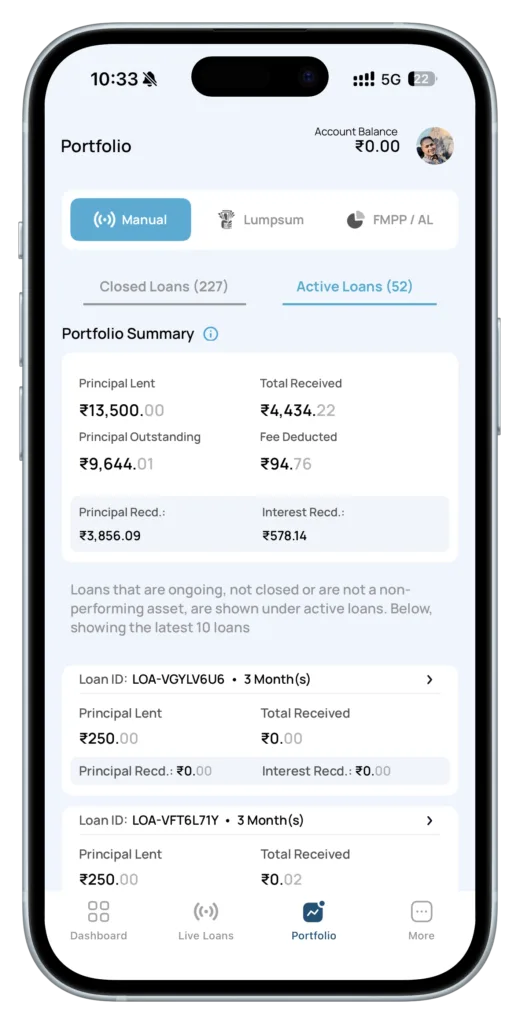
- Portfolio Summary with:
- Principal Lent
- Total Received
- Principal Outstanding
- Fee Deducted
- Principal Received
- Interest Received
- Individual Loan Cards that show:
- Loan ID
- Tenure
- Principal Lent
- Total Received
- Principal Received
- Interest Received
If you have more than 10 loans, scroll and tap View All to explore further.
Step 3: Monitor Loan-Level Details
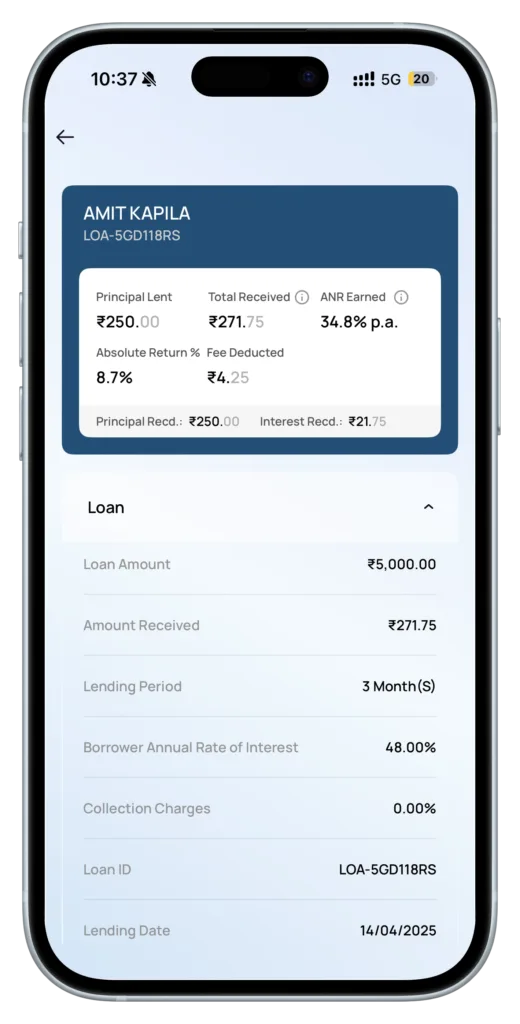
Tap any individual loan to view:
- Repayment schedules
- DPD or delays
- Borrower information
- Loan agreements
- Transaction history
- Status (Active, Closed, or NPA)
Key Sections to Explore
1. Portfolio Summary
This provides a macro view of your lending performance:
- Principal Lent: Total capital deployed
- Total Received: All principal and interest collected
- Principal Outstanding: Current unpaid amount
- Fee Deducted: Platform charges from interest earnings
- Principal Received: Amount of capital returned so far
- Interest Received: Total interest you have earned
2. Statements & Reports
For deeper analysis or record-keeping:
- Navigate to More → Statement & Reports → Manual Lending Report
- Choose duration: 3, 6, 9, 12 months, or Lifetime
- Select type: Active Loans, Closed Loans, or All Loans
- Tap Send Email to receive a detailed Excel report
The report includes data such as:
- Lending Date
- Disbursement Date
- Lending Amount
- Interest Rate
- Repayment Start Date
- Tenure
- Repayment Type
- Principal Received
- Interest Received
- Fee Deducted
- Profit & Loss
- Total Received
- Refunded Amount
- Status
- DPD
- NPA Amount
3. Closed Loans
Once loans complete their cycle or are marked NPA:
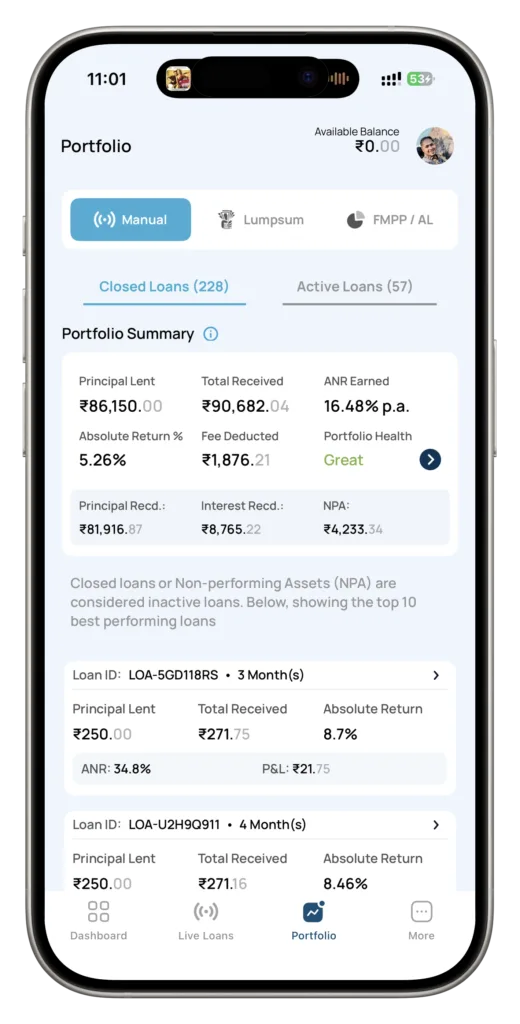
- Check the Closed Loans tab
- Review:
- Annualized Net Return (ANR)
- Absolute Return
- Portfolio health indicators
- Individual loan P&L
This helps you understand your realized returns and refine future investment strategy.
Best Practices to Maximize Your P2P Lending Performance
- Diversify Across Loans: Spread your principal across multiple borrowers to reduce concentration risk.
- Relend Repayments: Reinvesting repayments accelerates compounding.
- Monitor Regularly: A quick weekly check helps spot delays early.
- Stay Risk-Aware: P2P lending includes credit risk; occasional defaults are part of the model.
Need Assistance?
Our team is here to support you.
- Email: support@lendenclub.com
- Help Center: Available via the More section in the app
Your first repayment is an important moment in your lending journey, whether it arrives next month or the month after (depending on your lending date). As repayments begin to roll in, you’ll start seeing your returns come to life.
Happy Lending from the LenDenClub Team!

Team LenDenClub
LenDenClub is India’s largest peer to peer lending platform which started operations in India in 2015. We have been helping lenders diversify their portfolio beyond traditional investment instruments ever since.